

By PipeLedger · Published · Updated
On this page
Follow project costs from acquisition through sale
A development project can span several accounting years. Some costs remain on the Balance Sheet, others have already been expensed, and loans and owner contributions sit in separate accounts. Owners still need a clear picture of the whole project.
Useful reporting answers four questions: what has the project cost, what remains invested, how was it funded, and what has it earned?
At the sale, the $600,000 held as an asset becomes recognized expense. Adding remaining capitalized costs to cumulative project expenses keeps the same investment counted once:
| Measure | Before the sale | After the sale |
|---|---|---|
| Remaining capitalized project costs | $600,000 | $0 |
| Cumulative recorded project expenses | $40,000 | $640,000 |
| Total Project Cost | $640,000 | $640,000 |
PipeLedger follows both sides: Project Financial Position shows the remaining asset, while a lifetime Finance Catalog metric follows costs across approved asset and expense accounts. The controller determines the accounting treatment in the source books; PipeLedger carries it into the reports.
Accounting notes: capitalization, cost release, and escrow
Carrying cost is a business category, not an instruction to expense. Under US GAAP, eligibility for capitalization depends on the cost, the property’s intended use, and whether qualifying preparation or development is in progress. Interest has its own capitalization criteria. The expense treatment above is an explicit assumption for the completed property, not a rule for every development project. The relevant guidance includes ASC 970-340 and ASC 835-20; SEC staff correspondence on development-cost capitalization illustrates the need to explain that judgment.
The $100,000 of capitalized development in this example includes eligible construction-period interest. Owners contribute $150,000 at acquisition and a further $140,000 before the sale. The cost comparison assumes matching project and entity attribution, complete history, and no other movements. Monthly ending balances must not be added together.
At the sale, costs move from the Balance Sheet into expense. The report needs to retain their history so the same investment is counted once and its contribution to profit stays understandable. The intended reading order is simple: recorded sale revenue, acquisition cost released to cost of goods sold, other recognized project costs, and the resulting profit. PipeLedger uses recorded revenue, not a sale price inferred from a closing document; a ledger that records only a net gain needs review before the report can show gross proceeds and acquisition cost separately.
| Stage | What the source books record | What the project report must retain |
|---|---|---|
| Acquire and fund | Reconcile the buyer’s escrow statement to the purchase agreement, deposits already recorded, bank transfers, and loan documents. Allocate purchase price, eligible acquisition costs, prorations, prepaid items, and financing fees to their proper accounts. Identify the legal borrower and the source of the cash to close. | Acquisition cost, funding, and clearing entries attributed to the correct project and entity, without recording earlier deposits twice. |
| Develop — directly expensed costs | Debit the appropriate expense account; credit payables or cash. Paying an existing payable clears that liability rather than recording the expense again. | Recognized costs by project and category, including credits and corrections. |
| Develop — capitalized costs | Record eligible project costs as assets under the applicable policy. Review carrying costs and interest against the development stage and intended use; do not expense them solely because of their account label. | Additions, releases, and the remaining asset balance without duplicating a reclassified cost. |
| Sell and release costs | Reconcile the seller’s escrow statement to gross sale consideration, commissions, prorations, holdbacks, and net cash received. Separate any lien payoff into principal, interest, and fees using the lender’s statement. Record the cost release from the project’s carrying value in the books, not from the escrow statement. | Sale proceeds, recognized costs, and debt settlement remain separately traceable even when escrow remits one net amount. |
| Settle and close | Check final escrow disbursements, lien release or lender confirmation, remaining loan statements, final bills, and owner distributions. Company-level debt may remain outstanding after an individual property sells. | Explain residual balances and noncash financing before the project and LLC records are handed off for year-end work. |
These simplified entry patterns explain the reporting relationship. The accountant determines recognition dates, eligible costs, and any impairment or other adjustments. PipeLedger reads the resulting entries; its agent tools do not post them to the ERP.
A property-secured loan may be repaid directly by escrow; a corporate facility may be drawn and repaid outside the closing. If another group entity provides the funds, record the corresponding intercompany or equity relationship according to the agreement. If the company finances the buyer, distinguish the note receivable from cash collected. None of these arrangements can be established from the net bank deposit alone. The CFPB’s consumer Closing Disclosure guidance illustrates separate buyer, seller, and payoff amounts; commercial transactions may use different settlement forms.
In PipeLedger, review the project’s acquisition, sale, and funding entries alongside Project Financial Position. Match those entries to the closing documents retained by the controller; the reporting pipeline reads the ERP entries and does not infer the journal from an uploaded escrow statement.
Explain project investment and its capital structure
Owners need to see both the investment in a project and the capital supporting it. That becomes harder when a loan funds several properties or one LLC pays costs for another.
PipeLedger brings each project’s recorded assets, debt, and equity into one month-end view. The controller defines which accounts belong in each measure, while the supporting records retain the project and legal entity. Shared borrowing needs an agreed allocation before it can be compared project by project.
| Entry | What the books record | How the project report treats it |
|---|---|---|
| Loan proceeds and principal repayments | The legal borrower records borrowing and repayment against the relevant loan account. | Show outstanding project financing debt at month-end, separately from lifetime cost. |
| Owner or co-investor contribution | The receiving entity records capital contributed under the investment agreement. | Select the contribution accounts for the return denominator and equity accounts for the remaining funding balance. |
| Interest and financing charges | Apply the relevant expense, capitalization, or deferred-fee treatment. | Keep the cost of funding identifiable through its approved catalog category or subcategory. |
| Settlement of costs between LLCs | For a payment on another entity’s behalf, preserve the underlying cost and the corresponding due-to/due-from balances. Assess genuine service charges separately. | Retain both entities’ records and the project attribution. Combining project views does not itself perform intercompany eliminations. |
| Distribution or return of capital | Record the distribution against the appropriate equity account under the agreement. | Explain the remaining financing equity without reducing a gross-contribution denominator when distributions are recorded separately. |
In PipeLedger, economic roles identify the accounts used for capitalized cost, financing debt, and financing equity. Select contribution accounts separately from distributions and member lending when measuring return on contributed capital.
Ome Dezin reached this point after co-investor capital and transfers between multiple LLCs made project results hard to explain. The controller clarified project funding and account classifications in QuickBooks; the customer story shows the reporting that followed.
Make costs comparable across projects
Two projects rarely use the same account names. One books cabinetry under supplies, the other under a contractor; one capitalizes staging, the other expenses it. To compare them, the report needs business categories that sit above the account names and above the accounting treatment. Start with a small set that the controller and project managers can recognize.
- Hard costs: materials and supplies
- Hard costs: general contractor and trades
- Soft costs
- Other approved development subcategories
Each branch is a Catalog Subcategory (L5). Together, the approved subcategories form the Development Cost total.
PipeLedger groups accounts by their business purpose without changing their accounting treatment. Development Cost can include separate subcategories for materials, contractor packages, and soft costs across both asset and expense accounts.
Define the groups once and use them consistently across projects. Keep contractor packages together unless the source records support a reliable breakdown.
| Grouping | Examples to review | Comparison it supports |
|---|---|---|
| Acquisition | Property or land purchase and related acquisition accounts | The purchase investment, separate from the subsequent development work. |
| Hard costs — materials and supplies | Directly purchased cabinetry, fixtures, lumber, concrete, and other construction materials | Compare purchasing costs separately from contractor packages. |
| Hard costs — general contractor and trades | General contractor contracts, subcontractors, site work, and separately recorded construction labor | Compare contracted work; a contractor package may include materials, supervision, and overhead as well as labor. |
| Soft costs | Design, engineering, permits | Planning and professional services, with capitalization treatment still visible. |
| Financing costs | Interest and financing charges | The cost of borrowing, with capitalized and expensed treatment identified separately. |
| Carrying costs | Property taxes, insurance, utilities | The cost of holding the property during development. |
| Selling and closing costs | Broker fees, title, escrow, sale-related charges | The costs of completing a sale, distinguished from acquisition and construction. |
Configure these groups in PipeLedger
Use Development Cost as Catalog Category (L4), with Hard costs — materials and supplies and Hard costs — general contractor and trades as separate Catalog Subcategories (L5). This preserves one Development Cost total while exposing the two construction comparisons. Soft costs, carrying costs, and other approved components can be sibling subcategories. Reporting levels 1–3 continue to express the accounting classification; L4–L5 express the controller’s business grouping across asset and expense accounts.
In PipeLedger’s account classification editor, assign the L4/L5 values to the supporting accounts and record the rationale. A Finance Catalog metric can select all of L4 Development Cost or a specific L5 group; the published report can show both the total and its breakdown after refresh. Separate L4 categories are possible if your reporting structure requires them, but the total metric must then explicitly include both categories. L5 is sufficient for the split described here.
The available detail limits the comparison. A single contractor invoice covering labor and materials cannot become a reliable labor-only figure through relabeling. Keep the package in its contractor group unless the source records support a split. Products, quantities, and hours provide supporting detail where recorded; an account classification does not manufacture that detail.
The real decision is what Development Cost includes. The table below is one reasonable set of answers; the last column is where developers legitimately differ. Write the membership down and apply it to every project.
| Cost | Common treatment | In Development Cost? | What another developer might choose |
|---|---|---|---|
| Property purchase | Capitalized under the relevant asset guidance | Acquisition Cost is separately visible in the illustrated mapping. | A developer may include land in a broader development measure, provided the definition is explicit. |
| Materials and supplies; general contractor and trades | Assess capitalization using the cost and project stage | Yes, in separate hard-cost L5 groups. | Split contractor packages further only when the source detail supports the allocation. |
| Architect, engineering, and design fees | Capitalized or expensed by policy | Yes, as soft costs. | Some treat pre-acquisition design as an acquisition cost. |
| Property taxes, insurance, and utilities | Assess the cost, intended use, and stage; eligible costs during active development differ from post-completion carrying costs | Yes, as carrying costs under the illustrated mapping, across eligible asset and expense accounts. | Some report carrying costs outside Development Cost while retaining the accounting treatment. |
| Furniture and staging | Depends on use, ownership, and recoverability; reusable furnishings may remain assets | Include the approved accounts in the chosen subcategory. | Some distinguish furnishings sold with the property from staging used to market it. |
| Commission, title, escrow, and legal at sale | Expensed at sale | Yes, as closing costs. | Some keep selling costs outside development so it measures the build alone. |
| Interest and financing charges | Expensed, or capitalized where allowed | Depends on the approved mapping. Include interest assigned to Development Cost; exclude interest assigned to a separate Financing Cost category. | Some exclude interest from Development Cost and show it separately. |
Ome Dezin’s template groups accounts into Revenue, Acquisition Cost, Development Cost with five subcategories, and Financing Cost, and applies it to every project; the story shows it with illustrative amounts. The Total Project Cost definition illustrated here includes acquisition, cumulative project expenses, and remaining capitalized costs. Its membership is broader than the illustrated Development Cost category.
Why two reports can show different numbers
A property’s lifetime profit, its current funding, and the company’s rolling return use different clocks. Separate the three questions so a recent report date range does not truncate the history a lifetime calculation needs.
| Question | Measure | Time basis |
|---|---|---|
| What did this project earn? | Recorded net income and lifetime returns | Full available project history through one month-end |
| What remains invested? | Capitalized costs, equity, financing debt | Balances at the selected month-end |
| How is the company performing? | Income over average equity or assets | Explicit rolling window and averaging method |
Two correct reports can show different Development Cost figures for the same project. In the month before the sale, the fictional project’s lifetime Development Cost is $140,000: $100,000 capitalized plus $40,000 expensed. Its month-end capitalized development balance is $100,000. The balance alone omits the expensed costs; the lifetime figure alone does not say what is still on the Balance Sheet. Neither is wrong. They answer different questions, and a report should say which one it answers.
Before treating a difference as an error, align the project, entity, currency, reporting date, and account population, and check whether each report measures activity, remaining balances, or both. A capitalized-only view omits expensed costs; an accounting subcategory can differ from a business category; a saved classification may still be awaiting publication. A source publication date is not evidence that the accountant has closed the month.
In PipeLedger, compare Project Financial Position at one month-end with the Finance Catalog metric’s stated lifetime or rolling window. Inspect the metric’s account membership and use the supporting General Ledger lines to explain the difference. When a classification has changed, confirm the refreshed report contains that change before altering the formula.
Define returns that match the investment question
Choose the investment question before the formula. PipeLedger’s Finance Catalog records the agreed accounts, reporting period, and calculation so each return has a definition the controller can inspect.
Project metric definitions and technical formulas
The formulas use the metric IDs documented in the Ome Dezin story. The ome_ prefix identifies its company-specific definitions. When adapting them, replace it with your own company prefix, such as yourcompany_, in the metric IDs and every dependent formula, filter, and chart field. Keep canonical inputs such as net_income unchanged. Ome Dezin’s development_cost is an organization-authored metric without that prefix; give your equivalent definition your own company prefix if creating it anew.
Scroll horizontally to read the full formulas.
| Metric | Description | PipeLedger technical formula | What your business decides |
|---|---|---|---|
| Development Cost | Development spending across approved asset and expense accounts, whether expensed or capitalized. | development_cost = SUM_WINDOW(mart_gl_lines)include: taxonomy_level_4_catalog = Development Costwindow: lifetime | The membership from section 3. |
| Total Project Cost | Recorded project expenses plus capitalized costs still held as assets, including acquisition, through the reporting month-end. | ome_total_project_cost = ome_project_capitalized_cost_activity + ome_project_cost_expenseswindow: lifetime | Which acquisition and development accounts are included, and whether opening history and cost releases are complete. |
| Project Return on Equity (ROE) | Lifetime accounting return on the capital contributed to the project; not annualized. | ome_project_roe = SUM_WINDOW(net_income) / SUM_WINDOW(ome_project_equity_contributions)ome_project_equity_contributions: account_id in approved contribution accounts, credit-positivewindow: lifetimeannualization: noneunit: percentage | Which contribution accounts represent capital at risk, and that repayments and distributions are booked elsewhere. |
| Return on Project Cost | Lifetime accounting profit relative to Total Project Cost; not annualized. | ome_project_return_on_cost = SUM_WINDOW(net_income) / SUM_WINDOW(ome_total_project_cost)window: lifetimeannualization: noneunit: percentage | Keep acquisition in the denominator when the question is return on the whole project. |
| Loan-to-Cost (LTC) | Project debt relative to costs still capitalized at month-end. | loan_to_cost = financing_debt / capitalized_project_costsource: mart_project_financial_positionunit: percentage | Whether this outstanding-balance definition, or a lender’s commitment-based ratio, is the one being discussed. |
Company metric definitions and technical formulas
These company metrics use the IDs documented for Ome Dezin. Replace ome_ with your own company prefix throughout the configuration, and reuse equivalent existing definitions where available. Canonical inputs such as total_equity keep their existing IDs.
Scroll horizontally to read the full formulas.
| Metric | Description | PipeLedger technical formula | What your business decides |
|---|---|---|---|
| Debt-to-Capital | The share of debt and book equity represented by borrowing at month-end. | ome_debt_to_capital = ome_financing_debt / ome_debt_and_book_equityome_financing_debt: project_economic_role = financing_debt, before cashome_debt_and_book_equity: ome_financing_debt + total_equityunit: percentage | The borrowing population. Debt is not all liabilities, and the ratio is gross of cash unless you define a net measure. |
| Return on Average Equity — Trailing 12 Months | Twelve-month earnings relative to the average of opening and closing book equity. | ome_ttm_return_on_average_book_equity = SUM_WINDOW(net_income) / AVERAGE(OPENING(total_equity), CLOSING(total_equity))window: trailing_12_monthsannualization: noneunit: percentage | Whether an annual view is the primary story or the context for a longer one. |
| Return on Average Equity — Trailing 24 Months, Annualized | Two-year earnings relative to average monthly book equity, expressed as an annual return. | ome_t24m_return_on_average_book_equity = SUM_WINDOW(net_income) / AVERAGE_MONTH_END(total_equity)window: trailing_24_monthsannualization: linear, 12 / 24unit: percentage | Monthly average or opening and closing average, and whether to annualize; the two returns above use different averages on purpose. |
Return on average assets follows the same two patterns with total_assets as the denominator. Show the supporting net income, average capital, cash, and debt amounts alongside the percentages so readers can explain a change.
A worked annualization: $120,000 of income over 24 months divided by $600,000 of average book equity gives a 20% two-year accounting return. Linear annualization divides that return by two, giving 10% per year. The income covers the full two years; the denominator is the agreed average, not the sum of monthly balances. Show the income and capital amounts behind each return so a reader can see which one moved. Missing history or a nonpositive required denominator stays unavailable, and project or LLC percentages must not be summed into a group return.
How these definitions work in PipeLedger
Four decisions precede any formula:
- Profit. Governed Net Income is the numerator in every return here. Keep the overview’s Operating Profit distinct from it.
- Capital. For a project, contributed capital on the approved contribution accounts, so the return is measured against everything the owners put in. For the company, average book equity or average assets. A peak month-end balance is a different measure and answers a different question.
- Window. Lifetime for a project. Trailing twelve or twenty-four months for the company, chosen to fit the development cycle. A rolling window drops months, not whole projects: a profitable sale leaving the window lowers the rolling return while staying in the project’s lifetime history.
- Annualization. A two-year return can be divided by two for a linear annual figure. Label it whenever you do. The lifetime project returns illustrated here are not annualized.
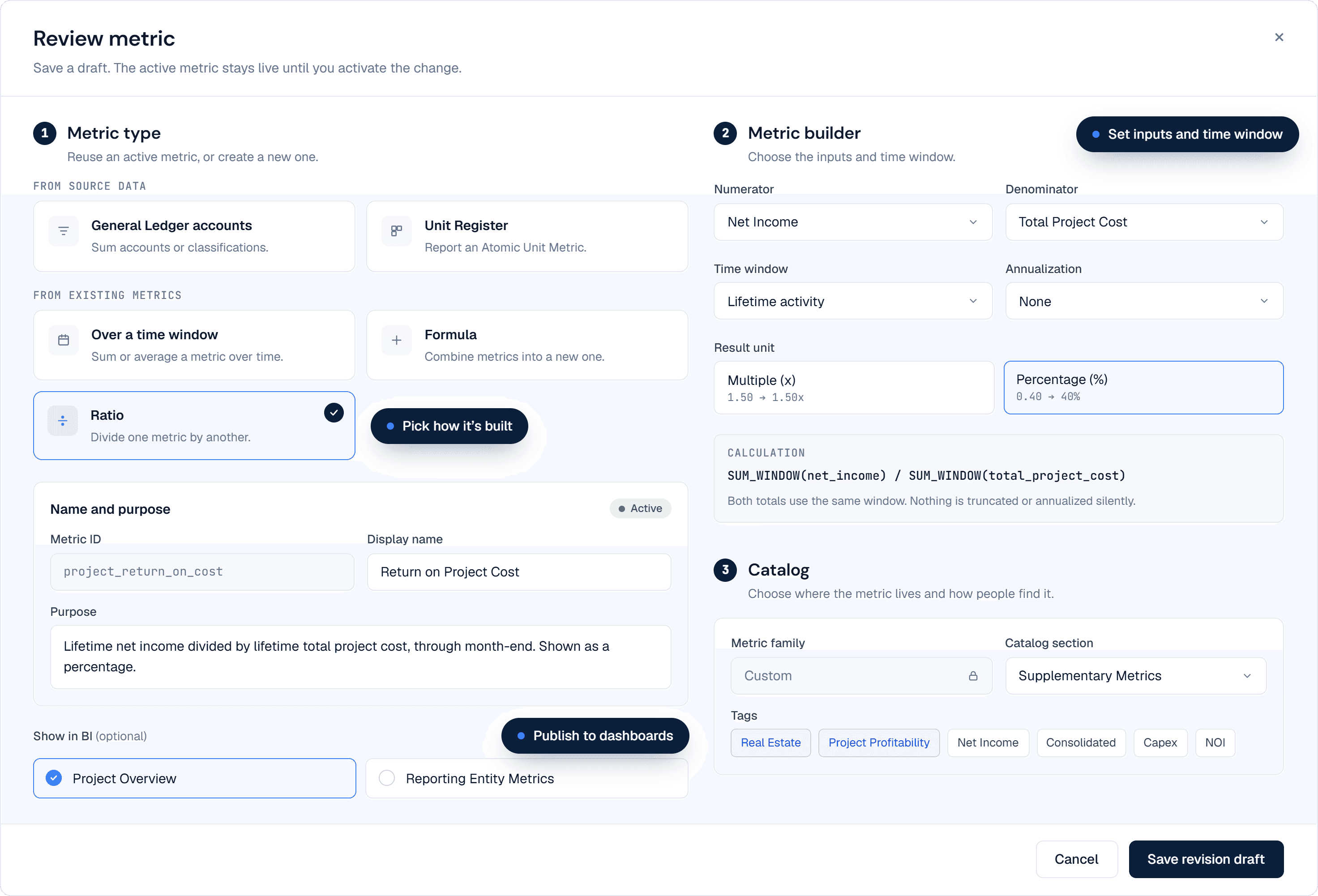
In PipeLedger’s Finance Metrics builder, choose the metric type, select its source accounts or input metrics, and set the period, sign, and result unit. For example, Return on Project Cost divides Net Income by Total Project Cost over the project’s lifetime, without annualization. The technical column describes those settings; it is not a free-form formula to paste into the editor.
A metric’s display name is the label readers see; its ID is the stable reference other metrics and tools use. Here, ome_project_return_on_cost is the name used in the Ome Dezin story. Create your own company-prefixed equivalent and update its input references consistently. Discover and select your own approved accounts; copying a metric name does not copy Ome Dezin’s account mapping or data.
Save and review a draft, then activate the approved revision. Where compatible, choose delivery in Project Overview or Reporting Entity Metrics. Confirm the revision has been published before expecting it in a dashboard; saving a draft does not change the live figures.
For a targeted measure, select exact account IDs rather than a broad category. Choose debit-positive or credit-positive presentation to match the intended meaning: debit-positive activity is debits less credits, so refunds and releases reduce the result. It is not a filter that discards every credit. Contribution accounts use credit-positive presentation, so contributions count positive and any return of capital booked there reduces the result.
A contributed-capital denominator accumulates contributions and is not reduced when capital is repaid, provided repayments and distributions are booked to separate accounts. This example sums signed activity in the selected accounts, so both contributions and reversals posted there affect the result. An explicit posting-direction filter is a different definition and must be reviewed separately.
The controller can review the finished definition before it changes a report. PipeLedger’s metric review shows the selected inputs, calculation, reporting window, annualization, and delivery settings together:
Compare planned costs, recorded costs, and commitments
To understand whether a project is tracking to plan, compare the same costs over the same period. A development budget may include work still held as an asset, so comparing it only with Income Statement expenses can leave out part of the project.
| Source | What PipeLedger supports | How to use the comparison |
|---|---|---|
| NetSuite | Project-linked budget lines provide period budgeted revenue and cost alongside actuals and cost variance. The budget category/version used by the pipeline must be agreed. | The standard period actual-cost measure is COGS plus expenses. For a whole-development comparison, define a separate comparison with capitalized costs included and the same budget scope. |
| QuickBooks Online | Project-tagged purchase-order lines provide a committed-cost measure, not native budget fields or a preserved original budget. | A controlled PO-based planning reference can support a comparison with project actuals, provided its coverage, status, and date basis are explicit. |
These fields are available in the underlying Project Overview source. Its current real-estate presentation does not include the budget and commitment columns. Configure the comparison from the underlying source with the implementation team; enabling a source budget alone will not add a budget table to an existing real-estate dashboard.
NetSuite: budget selection and period alignment
Confirm that the relevant budget lines are available to the connector and attributed to the project. Select the intended budget category with the implementation team; do not combine original and revised budgets. Project Overview carries the selected budget source and availability with its amounts. A headline project estimate alone is not a phased monthly budget.
Align the selected budget’s periods and accounts with the actual-cost measure. Project Overview’s standard actual cost is COGS plus expenses; a development budget that includes capitalized work needs a comparison that includes those costs too.
QuickBooks: purchase-order commitments and planning limits
Where the controller adopts a purchase-order workaround, assign every line to the correct project and use a consistent product or service item for the planned work or material. Agree the item’s accounting setup and budget coverage with the controller. PipeLedger retains the source project and item detail and brings eligible PO amounts into Project Overview as committed cost. Label a comparison based on those records “PO-based plan versus actuals” so its basis is clear.
The current PO measure follows eligible order amounts in the order month. Closed, canceled, rejected, or fully billed orders are excluded when that status is supplied. It is not a locked original budget or an automatically calculated unbilled balance. Preserve the approved baseline separately when it must survive those changes, avoid counting both a planning PO and the corresponding supplier order, and do not add commitments to posted actuals without reconciling their overlap. This workflow needs an agreed procurement process; entering a planning PO must not unintentionally authorize a supplier purchase.
Use the Finance Catalog cost definition from section 5 to make the comparison explicit. Label planned costs, commitments, and Total Project Cost separately, and match the accounts and time period on both sides.
Explain cash flow alongside project profit
A profitable project and a healthy cash position answer different questions. Development spending, sale receipts, borrowing, and owner funding all affect cash, but their classification depends on what the transaction represents.
Start with the property’s purpose. Capitalizing a cost does not, by itself, make its payment an investing cash flow. Under US GAAP, property developed for sale in the ordinary course differs from property held for rental; holding time alone does not decide the category.
| Economic purpose | Usual cash-flow treatment | Controller review |
|---|---|---|
| Develop or renovate property for sale in the ordinary course | Operating: inventory acquisition and development payments, and receipts from property sales. | Confirm the property is development inventory. A multi-year build does not become investing solely because it takes longer. |
| Acquire or construct property to hold for rental or long-term investment | Investing: acquisition, qualifying capital expenditure, and disposal receipts for the property asset. Rental receipts and routine operating payments remain operating. | Assess mixed use, changes in purpose, and the applicable asset guidance. Do not classify every payment associated with a rental property as investing. |
| Borrowing and owner funding | Financing: borrowing proceeds, principal repayments, equity contributions, and distributions. | Separate principal, interest, and fees. A net escrow remittance may contain several economic components. |
PipeLedger applies the controller’s approved cash-flow classifications after refresh and publication, then checks beginning cash plus the classified change against ending cash in the legal-entity Cash Flow Statement. Project-level balance changes support analysis; they are not a separately reconciled project Cash Flow Statement.
US GAAP references and controller judgments
The framework is ASC 230. FASB’s published Codification amendments reproduce the distinction between productive-asset acquisition, inventory payments, and debt repayment. Its historical real-estate example in Statement 102, paragraph 25 explains why land acquired for subdivision and resale is operating inventory. The older statement is explanatory background; the current Codification governs the accounting.
For financed closings, distinguish cash paid through escrow from assumed debt or other noncash consideration. Do not infer cash inflows and outflows simply from the asset and liability entries. FASB’s historical cash-flow guidance, paragraph 32, explains the separate disclosure of noncash investing and financing; the controller establishes the treatment from the settlement and lending documents.
How PipeLedger applies the classification
PipeLedger applies cash-flow classifications separately from the L4/L5 reporting categories. Its real-estate industry default treats eligible current development-cost accounts as operating inventory; non-current development assets do not take that default. The controller reviews the purpose, then uses the account’s Cash flow category, Calculation basis, and Standard detail to record a consistent treatment. A dedicated account normally needs an account override; an exceptional eligible posting in a mixed account can use an exact transaction-line override with supporting evidence and rationale.
The next successful transform and publication applies the approved classification and retains its provenance. Data Review exposes items needing investigation. A saved override awaiting processing has not yet changed the published statement.
Review the books with AI assistance
A useful monthly review starts with a result that needs an explanation. An authorized AI assistant connected through PipeLedger can retrieve the supporting entries and help investigate. The controller decides whether to correct the source books and verifies the refreshed result.
- Review a result
- Retrieve supporting entries
- Investigate the difference
- Correct the source books if needed
- Refresh and verify
| Exception | What to investigate |
|---|---|
| Capitalized cost remains after the sale | Whether the release agrees to the project’s carrying-value schedule and is attributed correctly. Use the seller’s escrow statement to verify the sale and settlement, not to determine the amount of cost released. |
| Loan balance remains after the sale | Reconcile any escrow payoff to the lender statement and loan account. A corporate facility or agreed continuing loan may remain outstanding after the property sells. |
| Equity balance remains after the sale | An unpaid distribution, or a contribution never attributed to the project. Review the contribution and distribution accounts separately. |
| Development Cost differs between two reports | Reporting date, entity, and account population. One report may be capitalized-only or use an accounting subcategory instead of the business category (section 4). |
| A cost sits on the wrong project | The project tag on the source entry. Correct it in the source system and refresh; do not adjust the report. |
| A transfer between LLCs shows as revenue or expense | The classification of the intercompany entry and its attribution to the project that incurred the cost (section 2). |
| A project shows equity but no contributions | Review whether the selected accounts capture the project’s contributions. The controller determines whether the account selection or the source classification needs correction. |
| A return shows as unavailable | Missing history or a nonpositive denominator. Confirm coverage of the full project history before changing the definition. |
Use Project Financial Position to compare each project’s remaining capitalized costs, financing debt, and selected equity balances at the same month-end, with the responsible LLC visible. After a sale, cost release, loan repayment, and owner distributions can land in different months, so a remaining balance is a prompt to investigate rather than an error by default. Equity balances describe recorded funding; they do not establish how much cash is available for distribution.
When the accountant corrects a project tag or funding entry in QuickBooks or NetSuite, PipeLedger brings the updated records through the reporting pipeline. Scheduled refreshes maintain the data between reviews; an additional refresh can retrieve corrections during the close. Confirm the reporting date and latest successful refresh before assessing the result. A successful refresh alone does not establish that the books reconcile.
Connect dashboards through your own Google Cloud project
For Google Data Studio dashboards, we recommend a Google Cloud account, project, and billing account owned by your business. PipeLedger shares your approved reporting data through a linked BigQuery dataset in that project. Configure Data Studio to run its queries in your project, so dashboard query usage is billed directly to your business. PipeLedger continues to operate the managed pipeline and published source data under your subscription.
Set up customer-hosted Google Data Studio
- Create or choose your business’s Google Cloud project, attach its billing account, and enable BigQuery and the required sharing APIs.
- In PipeLedger’s Data Sharing connections, choose Customer Hosted Google BigQuery and register the approved subscriber and customer project. Follow the private listing link to create the linked dataset in your project.
- In Data Studio, add the BigQuery connector, select your project and linked dataset, and connect the approved reporting tables. Verify that queries use your customer billing project before distributing the dashboard.
The linked dataset gives access to PipeLedger’s approved shared data; it does not move the extraction pipeline into your project. Google’s BigQuery connection guide explains the connector’s billing requirement.
Technical reference: reporting sources and pipeline checks
The source is the General Ledger, organized into reporting datasets called marts with different purposes. A transaction explains what happened; a month-end balance explains what remains.
| PipeLedger source | What it contributes | How to use it |
|---|---|---|
General Ledger Linesmart_gl_lines | Posted acquisition, development, sale, cost-release, and funding activity with account and project context. | Investigate an entry and accumulate the relevant signed activity over a period or project history. |
Project Financial Positionmart_project_financial_position | Project-tagged asset, debt, and equity balances by account and month-end. | Review remaining investment or select the capital history used by a project return. |
Project Overviewmart_project_overview | Monthly project revenue, COGS, expenses, operating profit, and classified financial-position movements. | Bring the project phases into a common summary. Its real estate presentation uses mart_project_overview_real_estate; position movements are not ending balances. |
Trial Balancemart_gl_trial_balance | Company account balances at month-end. | Support company assets, equity, cash, and financing ratios alongside income from the General Ledger. |
- Establish the required history. Check source coverage, opening balances, and the complete project history needed by the calculation. Fetch subsequent source corrections; processing an earlier extraction cannot include an entry that has not been retrieved.
- Preserve project and LLC attribution. Carry the same identities through purchases, development, transfers, sales, and releases. Investigate missing or inconsistent tags before relying on a project total.
- Apply agreed definitions. Use approved account classifications and active metrics consistently. A saved classification awaiting processing is different from the classification in the published report.
- Check the resulting reports. Reconcile representative projects and investigate differences in source coverage, account selection, or balances. A successful data refresh does not itself establish accounting reconciliation.
- Publish and identify the version being read. Deliver the configured data to authorized tools and, where used, dashboards. Show the reporting date and latest successful refresh; refresh the presentation after delivery so readers see the intended data.
Owners can give project managers access to the records for their responsible projects. The QuickBooks extraction guide explains how the source data reaches the reporting pipeline.
Hand your accountant an explainable project history
After a property sells, final contractor bills, lender settlements, and owner distributions can continue. Keep the project identifiable through those final entries so the accountant can follow its financial history when preparing the LLC's year-end accounts and tax return.
Build the handoff around that project: its recorded sale, the costs recognized against it, and any balances still outstanding at the reporting date. Connect the project summary to the supporting General Ledger entries in the responsible LLC. Where a balance remains, record what it represents and what still needs to happen, rather than leaving the accountant to reconstruct the explanation from owner emails.
- Reporting date and responsible LLC.
- Project summary with links or references to supporting entries.
- Remaining balances and the explanation for each.
- Unresolved items, their supporting evidence, and the next review action.
Use PipeLedger’s Project Overview for the result, Project Financial Position for the closing balances, and General Ledger Lines for the supporting entries. Include the reporting date, metric definitions, and the controller’s external escrow and lending documents with the handoff. The accountant can then follow the published numbers and the remaining review items without reconstructing the project from scratch.
Real estate development reporting FAQ
How should I report a real estate development project with capitalized costs?
Follow both the costs still held as assets and the costs already recognized as expenses. Use a month-end position to review remaining investment and complete project history to review lifetime cost and profit. Keep the project and legal entity consistent on acquisition, development, sale, and cost-release entries.
How do expensed and capitalized project costs differ?
The accounting policy determines which costs must be capitalized and which are expensed as incurred. Expensed costs enter the Income Statement; capitalized costs remain on the Balance Sheet until release or another required adjustment. A development project can contain both capitalized and expensed costs, and the report needs to retain that distinction.
Which cost groupings help compare development projects?
A useful starting point is acquisition, hard costs, soft costs, financing, carrying costs, and selling or closing costs. Define the accounts included in each group consistently across projects. These business categories supplement the asset-versus-expense classification; they do not decide capitalization policy.
How does a release to cost of goods sold affect Total Project Cost?
A recorded release reduces capitalized costs and increases recognized expense. Adding remaining capitalized costs to cumulative project expenses retains the cost once, provided the project, entity, and history cover both sides. Do not add the original capitalized cost again after it has been released.
Should company returns use twelve or twenty-four months?
Choose the period that helps explain your development cycle. Twelve months supports an annual view; twenty-four months can put longer projects and uneven sale timing in context. Specify whether capital is averaged from opening and closing balances or from every month-end, and label any annualization. Neither window is the default for every developer.
Do we need a BI dashboard to adopt this approach?
No. PipeLedger’s published financial data and Finance Catalog definitions support authorized AI tools, reports, queries, and configured BI delivery. Start with the controller’s accounting questions and review process. A dashboard is an optional presentation choice.
For the source-data foundation, read the QuickBooks extraction guide; for a customer example, read the Ome Dezin story.